%20(2).png)


Resetting your Password


How to reset your college password
If you are struggling to login to your college systems, you may need to reset your password.
If this is your first time accessing your account, please read our guide on how to activate your account.
You will need to have Microsoft Authenticator set up. If you’re having any problems with using your Authenticator, please check our FAQ guide here.
If you are on campus, you can also visit your college Learning Centre and a member of staff can help you change your password in person.
🔐
🔑
👍

How to access?
1. Open your internet browser, and go to www.office.com.
2. Click on the black sign in button.
3. Under the sign in box, click Can’t access your account?
4. A new page will appear asking which type of account you are trying to access. Select Work or school account.
5. Type in your college email address:
Username: Student ID@student.stcg.ac.uk
6. Type the CAPTCHA code (the numbers/letters shown on screen). Click Next.
Tip: If the CAPTCHA is hard to read, click the refresh button to get a new one.

.png)
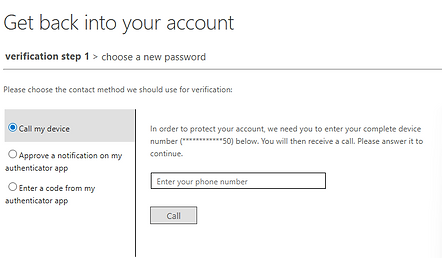
7. You will be asked to confirm it’s really you.
Choose the option you set up on your account:
-
Authenticator app:
Select “Approve a notification on my Authenticator app”, then click Send Notification. A message will pop up on your phone — tap Approve. -
Phone call:
Select the "Call my device", type you phone number and click Call me. Answer the call and follow the instructions to confirm.
IMPORTANT - If you have a new phone or your Authenticator isn’t working, please contact a member of the LRC Team or create a help ticket.
8. Create Your New Password
Type your new password
Type it again to confirm
Click Finish
Password rules:
✅Use at least 12 characters
✅ Include a capital letter
✅ Include a number
✖️Don’t use your name or birthday
Also available on college computers - if you forget your password when you're at a college computer, you can use the ‘Reset Password’ link on the login screen of a college computer and follow the on-screen steps. You will need to use your authentication method.
Need help?
If you need help accessing your student account, please create a help ticket to our AskLRC team.